We specialize in building robust e-commerce solutions using the Stripe payment gateway, and a crucial aspect of this is the stripe webhooks setup. In this guide, you’ll learn how to set up and troubleshoot Stripe webhooks, ensuring your online store’s payment processing runs smoothly. By the end of this article, you’ll understand the importance of Stripe webhooks, how to configure them, and how to resolve common issues that may arise.
Introduction to Stripe Webhooks
So, what are webhooks? In the context of Stripe, webhooks are notifications sent by Stripe to your server when a specific event occurs, such as a payment being made or a customer being updated. These notifications allow you to automate tasks and update your database in real-time, making them a vital component of your e-commerce setup. The benefits of using Stripe webhooks include improved security, reduced latency, and enhanced customer experience.
The benefits of using Stripe webhooks are numerous. For instance, they enable you to automate tasks such as sending confirmation emails or updating customer information, which can help streamline your business operations. Additionally, webhooks provide real-time updates, allowing you to respond promptly to events such as payment failures or successful transactions.
Setting Up Stripe Webhooks
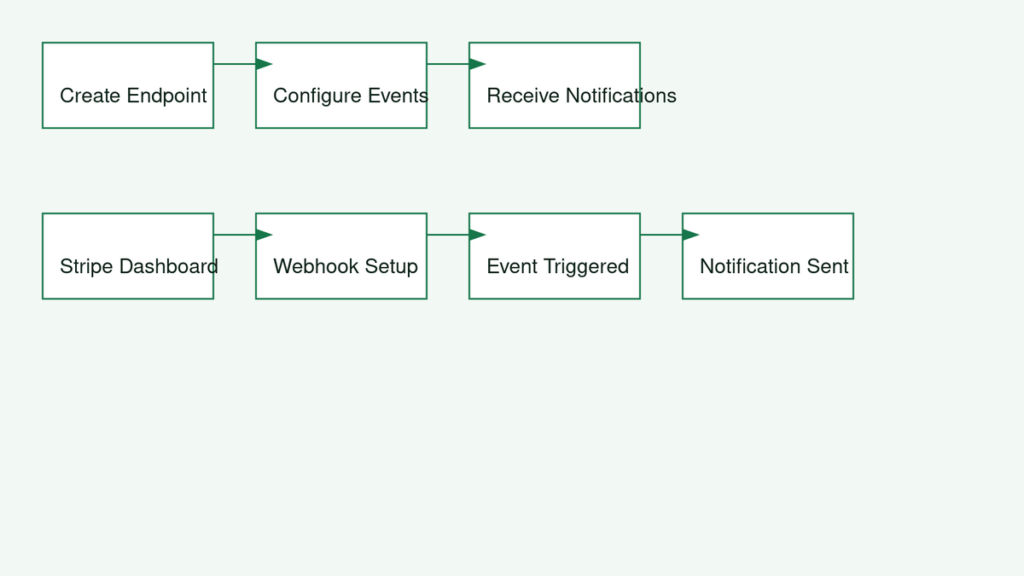
To set up Stripe webhooks, you need to create a webhook endpoint on your server and configure the events you want to receive notifications for. You can do this in the Stripe dashboard or through the Stripe API. Here are the steps to follow:
- Create a new webhook endpoint on your server, which will receive the notifications from Stripe.
- Configure the events you want to receive notifications for, such as payment successes or failures.
- Provide the webhook endpoint URL to Stripe, either through the dashboard or the API.
For example, you can use the following PHP code to create a basic webhook endpoint: $endpointSecret = 'whsec_1234567890'; $sig_header = $_SERVER['HTTP_STRIPE_SIGNATURE']; $event = null; $payload = @file_get_contents('php://input');
Common Issues with Stripe Webhooks
Despite the benefits of Stripe webhooks, common issues can arise, such as failed webhooks and missing events. Failed webhooks can occur due to incorrect configuration, server issues, or security vulnerabilities. Missing events, on the other hand, can be caused by issues with the webhook endpoint or the events configuration.
To troubleshoot these issues, you can check the Stripe dashboard for error messages, review your server logs, or test your webhook endpoint using tools like Stripe’s webhook testing tool. For more information on troubleshooting payment issues, you can visit our blog post on WooCommerce Payment Errors.
Best Practices for Using Stripe Webhooks
When using Stripe webhooks, it’s essential to consider security and reliability. You should ensure that your webhook endpoint is secure, using HTTPS and authentication mechanisms to prevent unauthorized access. Additionally, you should implement retry mechanisms to handle failed webhooks and ensure that your system can handle the volume of events generated by Stripe.
For more information on our website design and development services, including Stripe integration, visit our website. We also offer a free website check to help you identify areas for improvement.
In terms of reliability, you should monitor your webhook endpoint and Stripe events regularly to detect any issues. You can also use tools like Stripe’s dashboard to monitor your webhooks and events. For more information on getting started with Stripe, you can visit our blog post on Hello World.
Frequently asked questions
What are Stripe webhooks?
Stripe webhooks are notifications sent by Stripe to your server when a specific event occurs, such as a payment being made or a customer being updated. They allow you to automate tasks and update your database in real-time.
How do I set up Stripe webhooks?
To set up Stripe webhooks, you need to create a webhook endpoint on your server and configure the events you want to receive notifications for. You can do this in the Stripe dashboard or through the Stripe API.
What are some common issues with Stripe webhooks?
Common issues with Stripe webhooks include failed webhooks, missing events, and security issues. These can be caused by a variety of factors, including incorrect configuration, server issues, or security vulnerabilities.
How can I troubleshoot Stripe webhooks issues?
To troubleshoot Stripe webhooks issues, you can check the Stripe dashboard for error messages, review your server logs, and test your webhook endpoint using tools like Stripe’s webhook testing tool. If you need help with troubleshooting or setting up Stripe webhooks, don’t hesitate to contact us for a quote.
In conclusion, setting up and troubleshooting Stripe webhooks is crucial for ensuring your online store’s payment processing runs smoothly. By following the steps outlined in this guide, you can configure Stripe webhooks and resolve common issues that may arise. If you need help with Stripe integration or have questions about our services, feel free to reach out to us.